
COMPRA SEGURA
Parcele suas compras em até 12 vezes
ENTREGA GARANTIDA
Enviamos para todo o país via Correios
FALE COM CONSULTOR
WhatsApp (54) 99608-6544
Mais Vendidos
Seja bem-vindo a Líder Multiloja!
Cadastre o seu endereço de email em nossa newsletter e receba
os lançamentos e ofertas da Líder Multiloja.
Destaques
Navegue pelas Marcas


Novidades do Blog
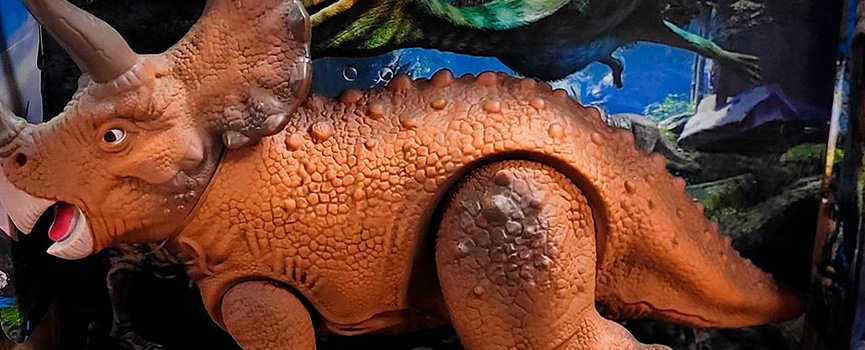
18 Maio 2023
Diversão garantida com o Triceratops
Com o Triceratops da linha Diver Dinos as horas de diversão são garantidas. Você poderá brincar com eles seguindo suas histórias ou colecionar pelo...
Ler mais
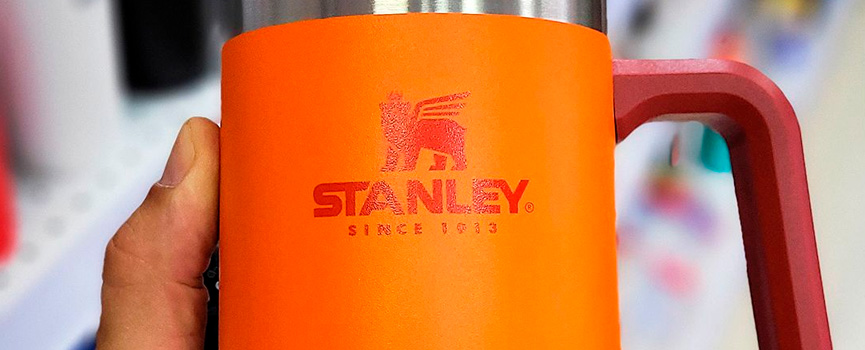
10 Abril 2023
Caneca térmica da Stanley de 700ml
Resistente, durável e atemporal, com preservação térmica de até 5 horas, parede dupla com isolamento a vácuo. Saboreie sua cerveja gelada até o últ...
Ler mais
Nossos Diferenciais
-
COMPRA SEGURA
Compre com segurança em nossa loja virtual e parcele até 12 vezes no cartão de crédito. -
ENTREGA GARANTIDA
Enviamos os nossos produtos para todo o Brasil via PAC e Sedex dos Correios. -
FALE COM CONSULTOR
Está com alguma dúvida? Entre em contato através do WhatsApp (54) 99608-6544.
